# Alshain et ses services
# _Intro_
## Listes des trucs
### Matrix
https://wiki.ppsfleet.navy/books/alshain-et-ses-services/page/matrix
- matrix.fede.re.conf:
- chat.fede.re.conf
- 💔 matrix-discord.service
### Keycloak
https://wiki.ppsfleet.navy/books/alshain-et-ses-services/page/keycloak
- auth.ppsfleet.navy.conf
### OSM
https://wiki.ppsfleet.navy/books/alshain-et-ses-services/page/osm
- brouter.maps.ppsfleet.navy.conf
- beta.maps.ppsfleet.navy.conf
- maps.ppsfleet.navy.conf
- tiles.maps.ppsfleet.navy.conf
- search.map.ppsfleet.navy.conf
- 💔 pg-tileserv.service
- simplestreetmap.service
- brouter.service
### Onlyoffice
https://wiki.ppsfleet.navy/books/alshain-et-ses-services/page/onlyoffice
- office.cloud.ppsfleet.navy.conf:
### Etherpad
- pad.blbl.ch.conf
- pad.fede.re.conf
- etherpad.service
### Notebook python (jupyterhub)
https://wiki.ppsfleet.navy/books/alshain-et-ses-services/page/installation-de-jupyterhub
- notebook.ppsfleet.navy.conf
- jupyter.service
### Music
- play.music.ppsfleet.navy.conf
### Les mails
https://wiki.ppsfleet.navy/books/alshain-et-ses-services/page/les-mails
- mail.ppsfleet.navy.conf
### Static files
- static.ppsfleet.navy.conf
- fonts.ppsfleet.navy.conf (to remove ?)
### rss
- feeds.ppsfleet.navy.conf
- 💔 feeds.ppsfleet.navy.conf/miniflux
- 'ttrss@.service'
### jitsi
- 💩 jicofo.service
- 💩 jitsi-videobridge.service
### blbl domains
- jeanplank.blbl.ch.conf
- klk.blbl.ch.conf
- laquete.blbl.ch.conf
- laquete.shiroimao.blbl.ch.conf
- turing-test.blbl.ch.conf
- icombat.blbl.ch.conf
- hitman.blbl.ch.conf
- foulard.blbl.ch.conf
- nomsdetoiles.blbl.ch.conf
- blbl.ch.conf
- blog.blbl.ch.conf
- dl.alshain.blbl.ch.conf
- bot.jeanplank.blbl.ch.conf
- jeanPlankApi.service
- jeanPlankBot.service
- klkIamonlyoneman.service
- laQuete.service
- shiroiMaoLaQuete.service
### Autre
- 💔 montbrun.fede.re.conf
- 💔 nitter.fede.re.conf
- bfme.hop.kim.conf: fichiers statiques pour jouer a Battle for the middle earth
- 💔 ntfy.fede.re.conf
- couac.tv.conf
- poll.fede.re.conf
- 💔 dx.sb.conf
- 💔 pouet.fede.re.conf
- fede.re.conf
- 💔 room.fede.re.conf
- satanama-yoga.fr.conf
- send.fede.re.conf
- firefoxSend.service (to update)
- hammmamdubocage.fr.conf
- startupvoyance.ppsfleet.navy.conf
- 💔 test2.ppsfleet.navy.conf
- 💔 test.ppsfleet.navy.conf
- tom.darboux.me.conf
- 💔 tts.ppsfleet.navy.conf
- 💔 livebook.ppsfleet.navy.conf ????????
- 💔 livre.fede.re.conf
- 💔 calibre.service
- wiki.ppsfleet.navy.conf
- 💔 zonemaster.ppsfleet.navy.conf
- zm-rpcapi.service
- zm-testagent.service
### systemd to delete or not
- ghost.service
- 💔 misskey.service
- 💔 sympa.service.d/
### PATH
- /srv/linto
- /srv/mangadexathome/
- /srv/mumble-web-proxy
- /srv/murmur
- /srv/pleroma
- /srv/pg-tileserv
- /srv/murmur
# Les mails
## Configuration des clients:
### SMTP
mail.ppsfleet.navy, 587 (tls)
### IMAP
mail.ppsfleet.navy, ssl/tls, 993
## Le serveur
Le serveur est composé de
- ~Opensmtpd~ Exim - serveur smtp ( envoi/reception de mail )
- Dovecot - serveur imap ( pour stocker les mails, et lire ses mails avec un client )
- Sieve (dans dovecot): rules pour trier les mails dans des dossiers etc...
- Dkimfilter - signe les mails avec la clé public du serveur
- Des champs dns - `/var/named/ppsfleet.navy.d/ppsfleet.navy.mail.include`
Tout est géré via systemd, installé sur l'auth
#### Dovecot
/etc/dovecot/dovecot.conf
*Les fichiers dans /etc/dovecot/conf.d ne sont pas lues...*
```
ssl = required
ssl_cert =
service_count = 1
# Number of processes to always keep waiting for more connections.
process_min_avail = 0
# If you set service_count=0, you probably need to grow this.
vsz_limit = 64M
}
service imap-login {
inet_listener imap {
port = 143
}
inet_listener imaps {
port = 993
}
}
service auth {
# SASL
unix_listener auth-client {
mode = 0600
user = mail
group = mail
}
}
passdb {
driver = passwd-file
args = scheme=SHA512-CRYPT /etc/mails/passwd.txt
}
userdb {
args = uid=vmail gid=vmail home=/data/mails/mailbox/%d/%n
driver = static
}
#userdb {
# driver = passwd-file
# args = /etc/dovecot/users.txt
# override_fields = uid=vmail gid=vmail home=/home/vmail/%n
#}
namespace inbox {
# Namespace type: private, shared or public
type = private
# Hierarchy separator to use. You should use the same separator for all
# namespaces or some clients get confused. '/' is usually a good one.
# The default however depends on the underlying mail storage format.
separator = '/'
inbox = yes
}
mail_location = maildir:/data/mails/mailbox/%d/%n
```
#### Exim
La conf exim est divisé en plusieurs section. https://www.exim.org/exim-html-current/doc/html/spec\_html/ch-the\_default\_configuration\_file.html
Les paramètre globaux (en haut), tel que les certificats et d'autres truc generaux
la section **begin acl.** Vérifie si on accepte d'envoyer le mail selon l'emetteur, a qui on l'envoi, le type mime etc...
On a configuré les sections via ces lignes:
```INI
acl_smtp_mail = acl_check_mail
acl_smtp_rcpt = acl_check_rcpt
.ifdef _HAVE_PRDR
acl_smtp_data_prdr = acl_check_prdr
.endif
acl_smtp_data = acl_check_data
acl_smtp_mime = acl_check_mime
```
la section **begin routers.**
> The routers that you find under 'routers configuration' contain conditions that determine under which conditions 'something' happens to the mail. What happens next is determined by the transports under 'transport configuration'.
```INI
system_aliases:
driver = redirect
allow_fail
allow_defer
data = ${lookup{$local_part@$domain}lsearch{/etc/mails/aliases.txt}}
# user = exim
file_transport = address_file
pipe_transport = address_pipe
localuser:
debug_print = "R: local_user for $local_part@$domain"
driver = accept
domains = +local_domains
# local_part_suffix = +* : -*
# local_part_suffix_optional
transport = dovecot_lmtp
cannot_route_message = Unknown user
```
la section **begin transports**
la section **begin retry**. Règle de retry
la section **begin rewrite**. vide
la section **begin authenticators**. Pour l'authentification.
On utilise dovecot.
```INI
begin authenticators
dovecot_plain:
driver = dovecot
public_name = PLAIN
server_socket = /var/run/dovecot/auth-client
server_set_id = $auth1
```
Pour que ca fonctionne on doit avoir exim lancé avec le groupe mail. C'est dans le fichier `/etc/sysconfig/exim`
### Sieve
Pour avoir sieve, il faut installer le paquet *dovecot-pigeonhole.* Puis tout se joue dans dovecot. La conf du dessus est configuré pour sieve.
*https://doc.dovecot.org/2.3/configuration\_manual/sieve/configuration/*
Il faut aussi configurer l'interface web dans */etc/roundcubemail/managesieve.inc.php.dist*
> $config\['managesieve\_host'\] = 'localhost:4190'; (pour correspondre à la conf de dovecot)
## Les utilisateurs:
Il y a 3 fichiers:
- Les noms de domaines: `/etc/mails/domains.txt`
- Les mot de passe: `/etc/mails/passwd.txt`
- Les alias (reception): `/etc/mails/aliases.txt`
Pour générer le hash du mot de passe: `doveadm pw -s SHA512-CRYPT`
**todo:** unifier tout ça, avec auth.ppsfleet.navy si possible
# Onlyoffice
## Base
Onlyoffice est installé en suivant la doc suivante `https://helpcenter.onlyoffice.com/installation/docs-community-install-centos.aspx`
Le service est `supervirsord`.
## Configuration
La config nginx est dans `includes/ds-*.conf`, `conf.d/http-common.conf` et `site-available/office.cloud.ppsfleet.navy.conf`
La config de l'éditeur se trouve dans `/etc/onlyoffice/documentserver/local.json`, c'est dans ce fichier qu'est defini le jeton secret.
Ne pas oublier de mettre :
```
host onlyoffice onlyoffice ::1/128 trust
host onlyoffice onlyoffice 127.0.0.1/32 trust
```
dans la conf de postgresql `/var/lib/pgsql/data/pg_hba.conf`
## Logs
Les logs se trouvent dans `/var/log/onlyoffice/documentserver/docservice/`
Les logs nginx sont dans `/var/log/onlyoffice/documentserver/nginx.error.log`
# Installation de jupyterHub
## Installation
`useradd -m -d /srv/jupyterhub jupyter`
`chsh jupyter` -> /usr/bin/fish
`sudo -i -u jupyter`
`npm install -u configurable-http-proxy`
`python3 -m pip install --user jupyterhub`
`python3 -m pip install --user oauthenticator`
`python3 -m pip install --user dockerspawner`
`set -U fish_user_paths ~/node_modules/.bin $fish_user_paths`
`set -U fish_user_paths ~/.local/bin/ $fish_user_paths`
`jupyterhub --generate-config` -> a copier en root dans /etc/jupyterhub
## Configuration
```python
from oauthenticator.generic import GenericOAuthenticator
## Class for authenticating users.
import os
os.environ['OAUTH2_TOKEN_URL'] = 'https://auth.ppsfleet.navy/auth/realms/Ppsfleet/protocol/openid-connect/token'
os.environ['OAUTH2_AUTHORIZE_URL'] = 'https://auth.ppsfleet.navy/auth/realms/Ppsfleet/protocol/openid-connect/auth'
os.environ['OAUTH2_USERDATA_URL'] = 'https://auth.ppsfleet.navy/auth/realms/Ppsfleet/protocol/openid-connect/userinfo'
c.JupyterHub.authenticator_class = GenericOAuthenticator
c.GenericOAuthenticator.login_service = 'Login with PPSfleet'
c.OAuthenticator.client_id = 'jupyterhub'
c.OAuthenticator.client_secret = 'secret'
c.GenericOAuthenticator.oauth_callback_url = 'https://notebook.ppsfleet.navy/hub/oauth_callback'
c.GenericOAuthenticator.userdata_url = 'https://auth.ppsfleet.navy/auth/realms/Ppsfleet/protocol/openid-connect/userinfo'
c.GenericOAuthenticator.token_url = 'https://auth.ppsfleet.navy/auth/realms/Ppsfleet/protocol/openid-connect/token'
c.GenericOAuthenticator.userdata_method = 'GET'
c.GenericOAuthenticator.userdata_params = {"state": "state"}
c.GenericOAuthenticator.username_key = "preferred_username"
## The public facing URL of the whole JupyterHub application.
#
# This is the address on which the proxy will bind. Sets protocol, ip, base_url
# Default: 'http://:8000'
c.JupyterHub.bind_url = 'http://127.0.0.1:8002'
## The internal port for the Hub process.
#
# This is the internal port of the hub itself. It should never be accessed
# directly. See JupyterHub.port for the public port to use when accessing
# jupyterhub. It is rare that this port should be set except in cases of port
# conflict.
#
# See also `hub_ip` for the ip and `hub_bind_url` for setting the full bind URL.
# Default: 8081
c.JupyterHub.hub_port = 8081
c.JupyterHub.hub_ip = '0.0.0.0'
c.JupyterHub.spawner_class = 'dockerspawner.DockerSpawner'
## Set the log level by value or name.
# Choices: any of [0, 10, 20, 30, 40, 50, 'DEBUG', 'INFO', 'WARN', 'ERROR', 'CRITICAL']
# Default: 30
c.Application.log_level = 20
## Set the log level by value or name.
# See also: Application.log_level
c.JupyterHub.log_level = 'INFO'
```
## Service
```ini
[Unit]
Description=JupyterHub
After=network.target
[Service]
Type=simple
KillMode=mixed
User=jupyter
Environment=PATH=/srv/jupyterhub/.local/bin/:/srv/jupyterhub/node_modules/.bin:/usr/local/sbin:/usr/local/bin:/usr/bin:/bin:/var/lib/snapd/snap/bin
ExecStart=/srv/jupyterhub/.local/bin/jupyterhub -f /etc/jupyterhub/jupyterhub_config.py
WorkingDirectory=/srv/jupyterhub
Restart=on-failure
[Install]
WantedBy=multi-user.target
```
# Virtualisation
## Création d'une VM
Pour créer une machine la procédure est la suivante :
* Se déplacer dans le dossier `/root/vms-init`
* Créer l'image de disque à partir de la base de l'os voulu `qemu-img create -f qcow2 -F qcow2 -b /var/lib/libvirt/images/bases/.img /var/lib/libvirt/images/storage/.img `
* Modifier le nom de l'instance et l'hostname dans `state/meta-data`:
```yaml
instance-id:
local-hostname: .vm.ppsfleet.navy
```
* Générer le volume de seed pour cloud-init `genisoimage -output /var/lib/libvirt/images/seeds/.iso -volid cidata -joliet -rock state/user-data state/meta-data`
* Démarrer la vm `virt-install --name --memory 2048 --vcpu 2 --import --disk path=/var/lib/libvirt/images/storage/.img,format=qcow2 --disk path=/var/lib/libvirt/images/seeds/.iso,device=cdrom --os-variant --network network=vm-net --wait 0`
Script complet:
```sh
export vm_name=test01
export os_variant=centos-stream8
cd /root/vms-init
qemu-img create -f qcow2 -F qcow2 -b /var/lib/libvirt/images/bases/${os_variant}.img /var/lib/libvirt/images/storage/${vm_name}.img 20G
cat > state/meta-data <
```
Distribution disponibles et testées :
| Nom | id (variante) |
|:--- |:---|
| Ubuntu 20.04 | ubuntu20.04 |
| Centos 8 | centos-stream8 |
| Debian 10 | debian10 |
## Connection
L'utilisateur par défaut est `roger` (mot de passe à voir dans `state/user-data`) et a les droits sudo.
Pour ce connecter en ssh il faut utiliser la clé `/root/.ssh/vm`:
```
ssh roger@${vm_name} -i ~/.ssh/vm
```
Une entrée A et AAAA est rajoutée dans le DNS local pour chaque VM dans la zone vm.ppsfleet.navy, qui est défini en tant que domaine de recherche sur alshain et pour les VMs.
L'IPv6 est routé publiquement ainsi on peut se connecter au VMs directement.
## Préparation d'une image
### Activer le client DHCPv6
Certaines distribution utilise seulement une configuration IPv6 stateless (ex. slaac) et il faut activer manuellement le dhcp.
1. Monter l'image en lecture/écriture
```sh
guestmount -a /var/lib/libvirt/images/bases/centos-stream8.img -i -o rw /mnt
```
2. Créer le fichier `/mnt/etc/cloud/cloud.cfg.d/10_network.cfg` avec le contenu suivant (**adapter le nom de l'interface par défault en fonction de l'os**, eth0 pour Centos, enp1s0 pour Debian):
```yaml
network:
version: 2
ethernets:
eth0:
dhcp4: true
dhcp6: true
```
3. Démonter l'image `umount /mnt`
4. Sous Debian il faudra aussi modifier la configuration dhcp, dans le fichier `/mnt/etc/dhcp/dhclient.conf`, remplacer la ligne `send host-name = gethostname();` par `send fqdn.fqdn = gethostname();`
# OSM
## La recherche
La recherche est sur `search.maps.ppsfleet.navy`, elle utilise Addok [https://addok.readthedocs.io/en/latest/](https://addok.readthedocs.io/en/latest/)
C'est installé dans `/srv/osm/env-addok`, le serveur utilise uwsgi dont la config est dans `/srv/osm/addok`. La config général est dans `/etc/addok`
Les données osm: `https://osm13.openstreetmap.fr/~cquest/osm_poi/`
### Installation fixes
```
pip install setuptools==57.5.0
```
pour fonctionner avec python3.10, besoin de la dernière version de falcon (3.1.0) (cloner les sources et éditer le requirement.txt)
## Le serveur de tuile
### Servir les tuiles
Le serveur de tuile utilise openmaptile, installé dans `/srv/www/maps.ppsfleet.navy/tileserver.php`, il utilise des fichiers mbtiles, qui sont eux aussi à la racine.
#### Le thème
Les thème des cartes se trouvent dans `/srv/www/maps.ppsfleet.navy/tileserver-data`.
Les deux utilisés sont:
* osm-bright-gl-style/style-cdn.json (pour /world)
* qwant-basic-gl-style-toulouse/built-style-debug.json (pour /toulouse)
C'est dans ces fichiers .json que le choix du fichier mbtile est definie.
- sources.basemap.tiles
- \_\_\_.poi.tiles
**Pour eviter le cache, on renomme le fichier mbtile à chaque modif avec dd-mm-yy-increment, on doit donc éditer le style par la suite**
**Pour eviter des pbolème de mémoire, dans le docker compose, mettre sous postgres: `shm_size: 5gb`**
### Générer les tuiles
1. Télécharger un fichier osm.pbf depuis [https://extract.bbbike.org/](https://extract.bbbike.org/) pour une zone custom ou depuis [http://download.geofabrik.de/](http://download.geofabrik.de/) pour une region ou un pays
2. Editer le schema, openmaptiles.yaml et layers/ ou pas (par default c'est pas si mal)
3. Editer le .env, principalement le `MAX_ZOOM`. Apriori, inutile de le mettre à plus de 14, tout est présent à ce zoom. Et la génération du zoom 16,17,18 prend un temps montrueux ( plusieurs jours pour la france )
4. Supprimer le dossier cache, build, clean le dossier data (ne laisser que le .pbf), supprimer `/var/lib/docker/volumes/openmaptiles_pgdata/`
5. Suivre le tuto de openmaptile [https://github.com/openmaptiles/openmaptiles](https://github.com/openmaptiles/openmaptiles]):
- `make destroy-db` # supprime les volumes etc...
- `make clean` # clean / remove existing build files
- `make init-dirs` # ??
- `make all` # ??
- `make` # generate build files (pareil que make all ??)
- `make start-db` # start up the database container.
- `make import-data` # Import external data from OpenStreetMapData, Natural Earth and OpenStreetMap Lake Labels.
- copy your pbf file to /data
- `make import-osm` # import data into postgres
- `make import-wikidata` # import Wikidata
- `make import-sql` # create / import sql funtions
- `make generate-bbox-file` # compute data bbox -- not needed for the whole planet
- `make generate-tiles-pg` # generate tiles (le plus long)
**Toulouse se fait en quelques minutes sur alshain**
**Midi pyrenées se fait en moins d'une heure sur alshain**
**La france se fait en un nombre certains d'heure, si le max_zoom est pas trop elevé (grand max 16). L'import OSM: 30/35 minutes, Import SQL: 2h30, Génération des tuiles: 17 heures zoom 14**
6. Compiler le thème de qwant-maps (je sais plus comment j'avais fait) [https://github.com/Qwant/qwant-basic-gl-style](https://github.com/Qwant/qwant-basic-gl-style)
## Le front-end
Il est dans `/srv/www/maps.ppsfleet.navy/front/{world|toulouse}`, c'est basé sur [https://github.com/tjiho/simplestreetmap](https://github.com/tjiho/simplestreetmap), avec l'utilisation de maplibre.
TODO: responsive sur telephone
## Les itineraires
Todo.
On pourrait se baser sur brouter. Voir aussi [https://safecycle.atelier-des-communs.fr/?](https://safecycle.atelier-des-communs.fr/?)
ou https://navitia.io/
## Ajouter des données
J'ai mis en place pg_tileserv. Il detecte automatiquement les tables postgis, et les transforme en tuile.
Il a son home dans /srv/pg-tileserv et sa conf dans /etc/pg-tileserv
## Générer des tuiles "raster" en node-js
```
git clone https://github.com/maplibre/maplibre-gl-native
```
```
dnf groupinstall "Development Tools" "Development Libraries"
```
```
dnf install glfw-devel freeglut-devel libuv-devel libXrandr-devel libjpeg-devel zlib-devel libpng-devel g++ mesa-dri-drivers xorg-x11-server-Xvfb
```
A la racine du repo:
```
cmake . -B build
```
```
vim vendor/benchmark/src/benchmark_register.h
> #include
> #include
vim build/CMakeCache.txt
> CMAKE_CXX_FLAGS:STRING=-pthread
```
```
cmake --build build
```
ca va planter en essayant de compiler la partie nodejs (aux alentours de 90%), c'est pas grave tant que ca plante pas avant
### Générer l'image
```
run.sh
> /srv/osm/maplibre-gl-native/build/bin/mbgl-render --style=https://maps.ppsfleet.navy/tileserver-data/qwant-basic-gl-style-toulouse/built-style-debug.json --output=test.png --width=512 --height=256 --lon=1.4436 --lat=43.6042 --zoom=13
```
```
xvfb-run ./run.sh
```
### Idée theme
[](https://wiki.ppsfleet.navy/uploads/images/gallery/2022-03/image-1646529377602.jpg)
# Simplestreetmap
# Les "plugins"
Un plugin serait un fichier js qui ajouterait des fonctionnalité optionelles à simplestreetmap
Le premier serait velotoulouse.
## Design (code)
- un icone et un nom a afficher dans le menu
- un objet js qui interagit avec la carte
- un composant html (dans un aside)
- un composant html (pour du fullscreen)
- un etat (actif/inactif)
# Architecture
## Le websocket
- client -> hello {token}
- server <- "hello", {data}
### actions
- add, {annotation}
- remove, {annotationId}
- hide, {annotationId}
- show, {annotationId}
# Todo
# Avant mise en ligne
## Les annotations
- [x] : cacher / afficher
- [ ] : éditer
- [ ] : couleur
- [ ] : nom
- [ ] : ~~horaire...~~ (depend du calendrier, pour plus tard)
- [x] : supprimer
- [x] : afficher une icone selon le type d'annotation
- [ ] : au clic -> centrer la carte dessus et affichage du detail dans l'onglet correspondant
- [x] place
- [ ] itineraires
- [x] centrer la carte
- [ ] afficher le detail
- [x] ajout de sources externes (cameras)
## Les itinéraires
### Pour le multi modal
- [ ] afficher les horaires et les correspondances
### Pour le vélo
- [ ] afficher le dénivelé (optionnel mais ca serait cool)
## Général
- [x] style des formulaire
- [x] afficher si pas d'itineraire
- [ ] loader qui tourne
- [ ] fichier de license dans le folder breeze
- [ ] mettre à jour le README
- [ ] partage/sauvegarde de la carte (avec un token ou dans le localStorage ?)
- [ ] reflexion sur l'édition collaborative (quid des conflits, si partage du token)
- [ ] inverser les champs from et to avec un bouton
- [ ] clic droit -> menu -> "itinerary from/to" "add a point" "force itinerary to pass at this point"
## Edition collaborative
- [x] Ajout place
- [ ] suppr place
- [ ] remove_annotation coté serveur
- [ ] listener coté client
- [ ] edition place
- [ ] ajout itineraire
- [ ] suppr itineraire
# Truc à ajouter aussi
- [ ] des infos sous la recherche
- [x] demmarer un itineraire d'une annotation
- [ ] clic sur un poi pour avoir des infos
- [ ] affichage temporel des annotations
- [ ] affichage du cadastre ou de l'ign ou des photo aerienne de l'ign
- [ ] sauvegarde des infos en bdd pour pouvoir partager la carte
- [ ] ajout d'annotation déssiné (rectange, path mais fait à la main)
- [ ] simple calcul de distance à vol d'oiseau
- [ ] recherche basé sur la localisation courante
- [ ] afficher les horaire d'un bus en cliquant sur l'arret
- [ ] rendre responsive
- [ ] thème nuit
- [ ] traduction en francais et autre langues
# Truc vraiment stylé un jour
- [ ] édition collaborative !
- [ ] redirection pour acheter son billet
- [ ] gps de voiture, et affichage des bouchons (même si vive le vélo et le train)
- [ ] synchro avec un calendrier
- [ ] syncro avec un compte apple ou google (pour aider à la migration)
# Truc de devops
- [ ] rebuild les tuiles une fois par mois
- [ ] rebuild de l'index de la rechecherche régulièrement
# Cameras
## Importer les données avec OSM2PGSQL
```
docker run --name postgis -e POSTGRES_PASSWORD=password -p 5432:5432 -d postgis/postgis
```
```lua
local cameras = osm2pgsql.define_node_table('cameras', {
{ column = 'id', sql_type = 'serial', create_only = true },
{ column = 'geom', type = 'point' },
})
local highways = osm2pgsql.define_way_table('highways', {
{ column = 'id', sql_type = 'serial', create_only = true },
{ column = 'geom', type = 'linestring' },
})
local buildings = osm2pgsql.define_area_table('buildings', {
{ column = 'id', sql_type = 'serial', create_only = true },
{ column = 'geom', type = 'polygon' },
})
function osm2pgsql.process_node(object)
if object.tags.man_made == 'surveillance' then
cameras:insert({
geom = object:as_point( )
})
end
end
function osm2pgsql.process_way(object)
if object.is_closed and object.tags.building then
buildings:insert({
geom = object:as_polygon()
})
end
if object.tags.highway then
highways:insert({
geom = object:as_linestring()
})
end
end
function osm2pgsql.process_relation(object)
if object.tags.type == 'multipolygon' and object.tags.building then
local geom = object:as_multipolygon()
for g in geom:geometries() do
buildings:insert({
geom = g,
})
end
end
end
```
```bash
osm2pgsql -d toto -U toto -W -H localhost -O flex -S extarct_features.lua st_quentin.osm.pbf
```
### Inporter les données de sous-surveillance.net
https://toulouse.sous-surveillance.net/spip.php?page=cameras&format=json&details=2&lang=fr
```
sed -i -e 's/id_camera/node_id/g' camera.json
```
```
ogr2ogr -f "PostgreSQL" PG:"dbname=postgres user=postgres password=password host='localhost'" "camera.json" -nln cameras -append -t_srs "EPSG:3857"
```
## Utiliser postgis
### Calculer une distance
```sql
with c1 as (select geom as g from cameras where id = 1), c2 as (select geom as g from cameras where id = 2) select ST_Distance(c1.g, c2.g) from c1, c2 ;
```
### calculer les ways qui sont a moins de 100m d'une camera
```sql
select c.node_id, h.way_id from cameras c left join highways h on ST_DWithin(c.geom, h.geom, 100) where c.id = 1
```
### Calculer les ways visible d'une camera
```sql
create view visible_streets_from_cam as
with
fields as (
select
c.node_id as camera_id,
h.way_id as street_id,
-- Changer ici pour la résolution du test d'intersection
ST_Segmentize(h.geom, 2) as street_geom,
c.geom as camera_coord
from
cameras c
left join
-- Changer ici pour la distance à la caméra
highways h on ST_DWithin(c.geom, h.geom, 100)
--where c.node_id = 9760071131
),
segments as (
select
camera_id,
street_id,
ST_MakeLine(camera_coord,p) as seg_line,
seg_id
from (
select
fields.camera_id,
fields.street_id,
fields.camera_coord,
generate_series(1, ST_NPoints(fields.street_geom)) as seg_id,
ST_PointN(fields.street_geom, generate_series(1, ST_NPoints(fields.street_geom))) as p
from fields
) as s
),
line_of_sight as (
select
segments.seg_id,
segments.camera_id,
segments.street_id,
buildings.area_id as building_id,
ST_Intersects(seg_line, buildings.geom) as inter
from segments
left join buildings
on ST_Intersects(seg_line, buildings.geom)
),
visible_street as (
select
camera_id,
street_id,
seg_id,
not((inter is not null) and inter) as is_visible,
building_id
from line_of_sight
)
select
distinct
street_id,
camera_id
from visible_street
where is_visible;
select STRING_AGG(distinct(street_id::text), ',') from visible_streets_from_cam;
```
```
psql -h localhost -U postgres -c "select STRING_AGG(distinct(street_id::text), ',') from visible_streets_from_cam;" > ids.txt
```
## Editer du pbf avec osmium
Convertis en format opl (format textuelle, éditable)
```bash
osmium cat st_quentin.osm.pbf -f opl > st_quentin.opl
```
L'inverse
```bash
osmium cat st_quentin.opl -f pbf > st_quentin.osm.pbf
```
Avoir un diff
```bash
osmium diff st_quentin.osm.pbf merge.osm.pbf -f opl > diff.txt
cat diff.txt | grep "^+" # ajout
cat diff.txt | grep "^-" # suppression
```
Appliquer un fichier de changeset (attention écrase toute la relation ou tout le noeud)
```bash
osmium apply-changes st_quentin.osm.pbf osmChange.xml -o new.osm.pbf
```
### un peu de python...
```python
import re
inputFile = "st_quentin.opl"
outputFile = "output.txt"
idsToEdit = ("w1087846855","w1087920777","w1087920778","w1087920779","w1087932398","w1087942997","w1087952021","w1087952022","w1087952024","w1087952025","w1087960194","w1087960196","w1087960210","w1087960223","w1087960224","w1089446799","w1089446800","w1112075298","w113961904","w113961905","w114536713","w114666459","w116382851","w116382861","w117355631","w11773344","w11773350","w122006038","w126094356","w126871656","w126871657","w126871658","w126871664","w126871669","w126871675","w126871690","w129705116","w147848058","w148736510","w148825323","w150550805","w155480974","w15802834","w15802836","w165807675","w168295763","w170146623","w170146625","w172022081","w172023915","w172023916","w173256365","w173256368","w173256369","w173256729","w173256730","w173256731","w173832779","w174488908","w177853034","w177853035","w180280918","w180461913","w180465548","w180468951","w182628812","w182629658","w185057057","w189637127","w193375648","w19844790","w19847245","w19848882","w202737485","w202970121","w203030595","w217421358","w222393302","w22341574","w22343527","w22343529","w22345126","w225625930","w22568170","w22568182","w22568375","w22568378","w22568386","w22568388","w22568424","w22568488","w22568523","w22588043","w22588046","w22604437","w22673740","w22674191","w22674884","w22675194","w22698778","w227400308","w227400309","w23025712","w277863607","w28353561","w29619599","w29619604","w315383203","w31662553","w31662878","w31662879","w31662880","w31662964","w31662965","w31662968","w31663124","w330925134","w330925135","w330926195","w331028474","w331028475","w339715316","w339726718","w339726719","w346027918","w349277858","w349531415","w35542048","w363185344","w364068225","w365390727","w370956707","w38742540","w38742541","w40372065","w40425070","w40425074","w4229251","w443334075","w443366920","w447751613","w447751614","w48225928","w492147752","w49835957","w49835959","w49835960","w50673023","w509055318","w509246741","w509246744","w509246745","w509246746","w509246747","w509246753","w51341167","w51341168","w515490602","w51692324","w52275569","w52303054","w52303060","w525662191","w525662193","w52613839","w52613863","w526190596","w530531180","w530531181","w530531182","w531463493","w531692522","w531692526","w531692527","w536092843","w536092847","w553315235","w587903986","w587903987","w587908623","w587908627","w587908630","w587908634","w59854247","w628788987","w630445718","w630446538","w630455616","w636627411","w636627412","w641622109","w641622111","w641622112","w641622114","w641622115","w641622116","w641622118","w650553749","w662006651","w662006652","w662006654","w694476166","w698066552","w705274809","w705274810","w705274811","w708338741","w764629037","w770613905","w770613907","w829119358","w829119361","w829119362","w829119363","w829119365","w829119366","w829180626","w829180633","w829252460","w85552224","w87565425","w879402866","w880518011","w881591456","w881764531","w881764532","w881764537","w881764538","w881764539","w881764540","w881764543","w881764545","w881764546","w881764547","w881764549","w881764552","w88646884","w88646885","w88646897","w89578796","w89685774","w89685814","w89685825","w930154230","w930154231","w944384994","w963397962","w963397963","w991218943","w991218944","w991218945","w991218946","w991218947")
fo = open(outputFile, "w")
with open(inputFile) as f:
for line in f:
if line.startswith(idsToEdit):
index = index + 1
newLine = re.sub(r'( T)', r'\1camera=yes,', line)
if line == newLine:
print(line)
fo.write(newLine)
else:
fo.write(line)
```
### Le même en c
(pas sur que ce soit plus opti)
```c
#define _GNU_SOURCE
#include
#include
#include
int StartsWith(const char *a, const char *b)
{
if(strncmp(a, b, strlen(b)) == 0) return 1;
return 0;
}
char *str_replace(char *orig, char *rep, char *with) {
char *result; // the return string
char *ins; // the next insert point
char *tmp; // varies
int len_rep; // length of rep (the string to remove)
int len_with; // length of with (the string to replace rep with)
int len_front; // distance between rep and end of last rep
int count; // number of replacements
// sanity checks and initialization
if (!orig || !rep)
return NULL;
len_rep = strlen(rep);
if (len_rep == 0)
return NULL; // empty rep causes infinite loop during count
if (!with)
with = "";
len_with = strlen(with);
// count the number of replacements needed
ins = orig;
for (count = 0; tmp = strstr(ins, rep); ++count) {
ins = tmp + len_rep;
}
tmp = result = malloc(strlen(orig) + (len_with - len_rep) * count + 1);
if (!result)
return NULL;
// first time through the loop, all the variable are set correctly
// from here on,
// tmp points to the end of the result string
// ins points to the next occurrence of rep in orig
// orig points to the remainder of orig after "end of rep"
while (count--) {
ins = strstr(orig, rep);
len_front = ins - orig;
tmp = strncpy(tmp, orig, len_front) + len_front;
tmp = strcpy(tmp, with) + len_with;
orig += len_front + len_rep; // move to next "end of rep"
}
strcpy(tmp, orig);
return result;
}
int main(void)
{
FILE * input_file;
FILE * output_file;
char * line = NULL;
char * new_line = NULL;
size_t len = 0;
ssize_t read;
char ids[253][12] = {"w1087846855","w1087920777","w1087920778","w1087920779","w1087932398","w1087942997","w1087952021","w1087952022","w1087952024","w1087952025","w1087960194","w1087960196","w1087960210","w1087960223","w1087960224","w1089446799","w1089446800","w1112075298","w113961904","w113961905","w114536713","w114666459","w116382851","w116382861","w117355631","w11773344","w11773350","w122006038","w126094356","w126871656","w126871657","w126871658","w126871664","w126871669","w126871675","w126871690","w129705116","w147848058","w148736510","w148825323","w150550805","w155480974","w15802834","w15802836","w165807675","w168295763","w170146623","w170146625","w172022081","w172023915","w172023916","w173256365","w173256368","w173256369","w173256729","w173256730","w173256731","w173832779","w174488908","w177853034","w177853035","w180280918","w180461913","w180465548","w180468951","w182628812","w182629658","w185057057","w189637127","w193375648","w19844790","w19847245","w19848882","w202737485","w202970121","w203030595","w217421358","w222393302","w22341574","w22343527","w22343529","w22345126","w225625930","w22568170","w22568182","w22568375","w22568378","w22568386","w22568388","w22568424","w22568488","w22568523","w22588043","w22588046","w22604437","w22673740","w22674191","w22674884","w22675194","w22698778","w227400308","w227400309","w23025712","w277863607","w28353561","w29619599","w29619604","w315383203","w31662553","w31662878","w31662879","w31662880","w31662964","w31662965","w31662968","w31663124","w330925134","w330925135","w330926195","w331028474","w331028475","w339715316","w339726718","w339726719","w346027918","w349277858","w349531415","w35542048","w363185344","w364068225","w365390727","w370956707","w38742540","w38742541","w40372065","w40425070","w40425074","w4229251","w443334075","w443366920","w447751613","w447751614","w48225928","w492147752","w49835957","w49835959","w49835960","w50673023","w509055318","w509246741","w509246744","w509246745","w509246746","w509246747","w509246753","w51341167","w51341168","w515490602","w51692324","w52275569","w52303054","w52303060","w525662191","w525662193","w52613839","w52613863","w526190596","w530531180","w530531181","w530531182","w531463493","w531692522","w531692526","w531692527","w536092843","w536092847","w553315235","w587903986","w587903987","w587908623","w587908627","w587908630","w587908634","w59854247","w628788987","w630445718","w630446538","w630455616","w636627411","w636627412","w641622109","w641622111","w641622112","w641622114","w641622115","w641622116","w641622118","w650553749","w662006651","w662006652","w662006654","w694476166","w698066552","w705274809","w705274810","w705274811","w708338741","w764629037","w770613905","w770613907","w829119358","w829119361","w829119362","w829119363","w829119365","w829119366","w829180626","w829180633","w829252460","w85552224","w87565425","w879402866","w880518011","w881591456","w881764531","w881764532","w881764537","w881764538","w881764539","w881764540","w881764543","w881764545","w881764546","w881764547","w881764549","w881764552","w88646884","w88646885","w88646897","w89578796","w89685774","w89685814","w89685825","w930154230","w930154231","w944384994","w963397962","w963397963","w991218943","w991218944","w991218945","w991218946","w991218947"};
input_file = fopen("france.opl", "r");
output_file = fopen("output2.txt", "w");
int find_line = 0;
if (input_file == NULL)
{
printf("error input");
exit(EXIT_FAILURE);
}
if (!output_file) {
printf("error output");
exit(EXIT_FAILURE);
}
while ((read = getline(&line, &len, input_file)) != -1)
{
find_line = 0;
for (int i = 0; i < 256; i++)
{
if(StartsWith(line, ids[i]))
{
find_line = 1;
new_line = str_replace(line," T"," Tcamera=yes,");
fwrite(new_line, 1, strlen(new_line), output_file);
break;
//printf("%s", line);
}
}
if(!find_line)
fwrite(line, 1, strlen(line), output_file);
}
fclose(input_file);
fclose(output_file);
if (line)
free(line);
exit(EXIT_SUCCESS);
}
```
## Générer les fichiers brouter
Les script dans le repo fonctionne pas (super :/)
Là une issue ou il y a un script ok.
https://github.com/abrensch/brouter/issues/199
```bash
#!/bin/bash
set -e
# Added
JAVA='/usr/bin/java -Xmx6144m -Xms6144m -Xmn256m'
BROUTER_PROFILES=$(realpath "../../profiles2")
BROUTER_JAR=$(realpath $(ls ../../../brouter-server/build/libs/brouter-*-all.jar))
OSMOSIS_JAR=$(realpath "../../pbfparser/osmosis.jar")
PROTOBUF_JAR=$(realpath "../../pbfparser/protobuf.jar")
PBFPARSER_JAR=$(realpath "../../pbfparser/pbfparser.jar")
PLANET_FILE=${PLANET_FILE:-$(realpath "./france-latest.osm.pbf")} # (!) expects PLANET_FILE to be set OR 'planet-latest.osm.pbf'
SRTM_PATH=/home/user/workspace/brouter_original/misc/scripts/mapcreation/srtm
rm -rf planet-old.osm.pbf
rm -rf planet-new.osm.pbf
touch mapsnapshpttime.txt
rm -rf tmp
mkdir tmp
cd tmp
mkdir nodetiles
mkdir waytiles
mkdir waytiles55
mkdir nodes55
$JAVA -cp ${OSMOSIS_JAR}:${PROTOBUF_JAR}:${PBFPARSER_JAR}:${BROUTER_JAR} \
-Ddeletetmpfiles=true -DuseDenseMaps=true \
btools.util.StackSampler btools.mapcreator.OsmFastCutter \
${BROUTER_PROFILES}/lookups.dat nodetiles waytiles nodes55 waytiles55 \
bordernids.dat relations.dat restrictions.dat \
${BROUTER_PROFILES}/all.brf ${BROUTER_PROFILES}/trekking.brf ${BROUTER_PROFILES}/softaccess.brf \
${PLANET_FILE}
printf "\n\n---------------------- unotes55 -----------------\n\n\n"
mkdir unodes55
$JAVA -cp ${BROUTER_JAR} -Ddeletetmpfiles=true -DuseDenseMaps=true btools.util.StackSampler \
btools.mapcreator.PosUnifier nodes55 unodes55 bordernids.dat bordernodes.dat ${SRTM_PATH}
printf "\n\n---------------------- segments -----------------\n\n\n"
mkdir segments
$JAVA -cp ${BROUTER_JAR} -DuseDenseMaps=true -DskipEncodingCheck=true btools.util.StackSampler \
btools.mapcreator.WayLinker unodes55 waytiles55 bordernodes.dat restrictions.dat ${BROUTER_PROFILES}/lookups.dat \
${BROUTER_PROFILES}/all.brf segments rd5
cd ..
rm -rf segments
mv tmp/segments segments
touch -r mapsnapshpttime.txt segments/*.rd5
```
## Profils brouter
C'est pas ouf, mais pour le POC, j'ai réussi à modifier le fichier trekking en mettant:
```
assign camera = camera=yes
assign turncost = if camera then 86000 else if is_ldcr then 0
else if junction=roundabout then 0
else 90
```
### Pour tester
brouter-web (c'est du statique)
https://github.com/nrenner/brouter-web
## Tiles from postgis
```
export DATABASE_URL=postgresql://postgres:password@localhost/postgres
~/bin/pg_tileserv_latest_linux/pg_tileserv
```
# fix psql import
```
create or replace function cast_to_city_place(text) returns city_place as $$
begin
return cast($1 as city_place);
exception
when invalid_text_representation then
return 'town';
end;
$$ language plpgsql immutable;
ALTER TABLE osm_city_point
ALTER COLUMN place TYPE city_place USING cast_to_city_place(place);
```
# Addok
## Création des données
### Package (fedora)
- postgis-client
- osmctools
### Commands
```
podman run --name postgis -e POSTGRES_PASSWORD=mysecretpassword -p 127.0.0.1:54321:5432 -d postgis/postgis
export PGPASSWORD=mysecretpassword
psql -h 127.0.0.1 -p 54321 -Upostgres -c "CREATE EXTENSION unaccent"
```
puis
- Cloner https://github.com/osm-fr/osmpoi4addok
- Remplacer tout les appels à psql par `psql -h 127.0.0.1 -p 54321 -Upostgres`
- Editer `30-extract-poi.sh` et mettre `PBF_NAME` avec le bon nom
- Compiler `osmfilter` et `osmconvert` depuis les sources: http://m.m.i24.cc/osmfilter.c et http://m.m.i24.cc/osmconvert.c
- Lancer les script un par un
Sur ma tour (rizen 5), en dehors des téléchargements, midi pyrennées se fait en quelques minutes
# Update tiles
## Télécharger le diff
```sh
source env-openmaptiles/bin/activate.fish
pyosmium-get-changes -O france.osm.pbf -o changes.osc.gz
```
Pour 1 mois et demi de diff: instantané
## Importer le diff
```
make import-diff
```
Pour 1 mois et demi de diff: une 10aine de minutes
## Générer les tuiles
```
make generate-changed-tiles
```
# Mumble
**room.fede.re**
## Server
Le serveur est `murmur`, avec sa config dans `/etc/murmur/murmur.ini`
`ps -aux | grep murmurd` ou `ps -aux | grep mumble-server` pour savoir si il est démarré (todo: faire un service)
Pour le demmarer: `murmurd`
## Proxy websocket
https://github.com/Johni0702/mumble-web-proxy
Le proxy websocket est dans `/srv/mumble-web-proxy`
### Install
Il y a une erreur dans la build, voir issue: https://github.com/Johni0702/mumble-web-proxy/issues/31
Il faut installer `https://rustup.rs/`
Puis `~/.cargo/bin/rustup default 1.48.0`
Et `~/.cargo/bin/cargo build release`
### Run
`target/release/mumble-web-proxy --listen-ws 64737 --server room.fede.re:64738`
## Usage
L'utilisateur admin est `SuperUser`.
# ttrss
## Config
```php
putenv('TTRSS_DB_HOST=localhost');
putenv('TTRSS_DB_USER=feeds');
putenv('TTRSS_DB_NAME=feeds');
putenv('TTRSS_DB_PASS=...');
putenv('TTRSS_DB_PORT=3306');
putenv('TTRSS_DB_TYPE=mysql');
putenv('TTRSS_SELF_URL_PATH=https://feeds.ppsfleet.navy');
putenv('TTRSS_PHP_EXECUTABLE=/usr/bin/php'); # normally something like /usr/bin/php
```
Le plugin `af_readability` est bien utile pour télecharger le contenu des articles (à activer dans les paramètre puis pour chaque feed)
L'option `Mark read on scroll` est aussi sympa.
## Thème custom
le thème de base est pas ouf, surtout pour la lecture des articles (un peu la fonctionnalitée principale d'un lecteur rss)
[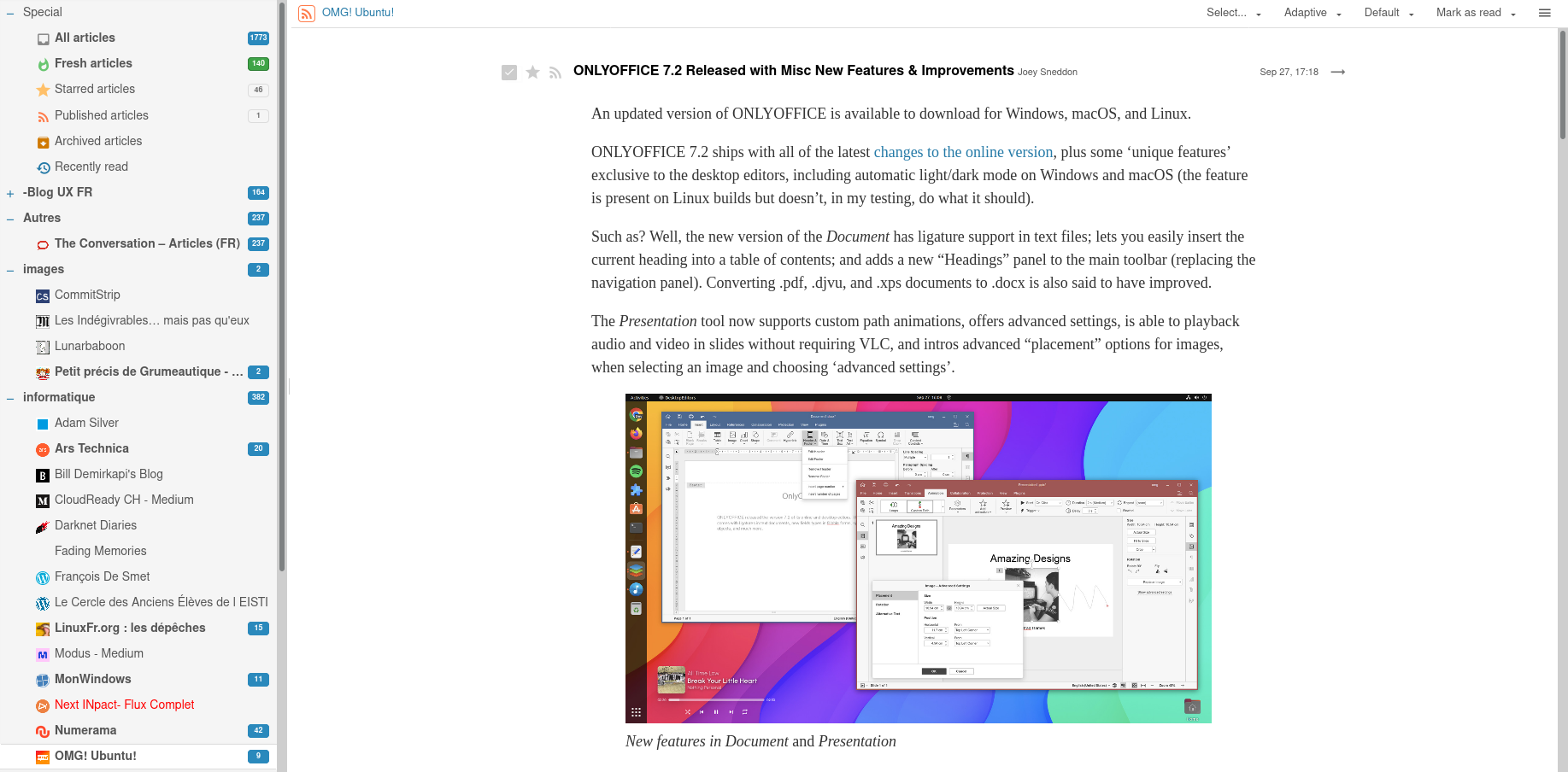](https://wiki.ppsfleet.navy/uploads/images/gallery/2022-10/image-1664806618670.png)
```css
.cdm.expandable.active, .cdm.expanded
{
max-width:1000px;
margin-left:auto;
margin-right:auto;
background-color: white;
/*box-shadow: 1px 1px 18px rgba(0,0,0,0.1);*/
margin-top:15px;
padding:20px;
border-bottom: 2px solid;
width: 90%;
}
.cdm .content-inner
{
font-family: 'Liberation Serif' !important;
font-size: 18px !important;
line-height: 1.5em !important;
font-weight: 300 !important;
color: #333 !important;
}
.cdm .content
{
max-width:800px;
margin:auto;
}
.cdm.dijitBorderContainerPane {
position:initial !important;
}
#headlines-wrap-inner,#headlines-frame
{
/*background-color: #e6e6e6;*/
}
.cdm.expanded .footer {
border:none !important;
}
.cdm.expandable.active .header[data-is-stuck], .cdm.expanded .header[data-is-stuck] {
margin-top: 10px !important;
box-shadow: rgba(0, 0, 0, 0.3) 2px 2px 18px !important;
border-color: grey !important;
border-width: 1px 1px !important;
border-style: solid !important;
top:1px;
}
```
# NTFY
NTFY est un serveur push pour gerer entre autre les notif sur android sans passer par les serveurs google.
C'est un peu du mqtt, mais c'est pas du mqtt.
## Coté serveur (sur alshain)
j'ai suivi la doc (en gros): https://docs.ntfy.sh/install/
```
sudo rpm -ivh https://github.com/binwiederhier/ntfy/releases/download/v1.30.1/ntfy_1.30.1_linux_amd64.rpm4
```
la config: /etc/ntfy/server.yml
le service: ntfy
le domaine: ntfy.fede.re
le socket: /var/lib/ntfy/ntfy.sock
## Coté client (sur le tel)
Installer ntfy via fdroid.
Puis configurer les notifs de vos app de libriste pour passer par ntfy. (La plupart des client matrix et des clients mastodon)
Oh, et désactiver l'optimisation de batterie pour ntfy.
# openvpn
## Start
systemctl start openvpn-server@server.service
## La conf
```
client
tls-client
ca /path/to/ca.crt
cert /path/to/client.crt
key /path/to/client.key
tls-crypt /path/to/alshain.tlsauth
;remote-cert-eku "TLS Web Client Authentication"
remote-cert-eku 1.3.6.1.5.5.7.3.1
proto udp
cipher AES-256-CBC
remote alshain.ppsfleet.navy 1194 udp
dev tun
topology subnet
pull
;user nobody
;group nobody
````
## Générer un certificat
\# todo
# REDIS
on doit éditer le fichier /etc/systemd/system/redis.service.d/limit.conf avec
```
[Service]
LimitNOFILE=10240
TimeoutStartSec=300s
TimeoutStopSec=300s
```
# jitsi
## Installation
```sh
dnf install maven prosody
```
```sh
prosodyctl cert generate meet.fede.re
prosodyctl cert generate auth.meet.fede.re
ln -s /var/lib/prosody/auth.meet.fede.re.crt /etc/pki/ca-trust/source/anchors/
update-ca-trust
prosodyctl register focus auth.meet.fede.re
systemctl start prosody
```
```sh
useradd jitsi -m -s /usr/bin/fish -d /srv/jitsi
sudo -iu jitsi
wget https://github.com/jitsi/jitsi-videobridge/archive/refs/tags/stable/jitsi-meet_9364.zip
unzip jitsi-meet_9364.zip
mv jitsi-videobridge-stable-jitsi-meet_9364/ jitsi-2.0.9364
cd jitsi-2.0.9364
```
Edit pom.xml
```xml
...
en
-Duser.language=${user.language}
```
```
mvn install
```
# Etherpad
```
root ~ # useradd -m -r -d /opt/etherpad -U etherpad
root ~ # sudo -iu etherpad git clone https://github.com/ether/etherpad-lite
root ~ # sudo -iu etherpad npm config set prefix '~/.local/'
root ~ # sudo -iu etherpad npm install -g pnpm
etherpad ~ % fish_add_path ~/.local/bin/
etherpad ~/etherpad-lite % ~/.local/bin/pnpm run plugins install ep_delete_after_delay
```
Image de fond modifiée : `src/static/skins/colibris/images/fond.jpg`
Modification du `settings.json`:
```json
{
"title": "Pad.fede.re",
"favicon": "favicon.ico",
"ip": "127.0.0.1",
"port": 8679,
"cleanup": {
"enabled": true,
"keepRevisions": 100
},
"ep_delete_after_delay": {
"delay": 15552000, // 60 seconds * 60 minutes * 24 hours * 30 days * 6 = 6 months, in seconds
"loop": true,
"loopDelay": 3600, // one hour, in seconds
"deleteAtStart": true,
"text": "The content of this pad has been deleted since it was older than the configured delay."
},
"users": {
"admin": {
"password": "changeme",
"is_admin": true
}
},
}
```
Fichier du service systemd:
```
cat /etc/systemd/system/etherpad.service
[Unit]
Description=etherpad
After=network.target
[Service]
Type=simple
KillMode=mixed
User=etherpad
Environment=PATH=/opt/etherpad/.local/bin:/usr/local/sbin:/usr/local/bin:/usr/sbin:/usr/bin:/sbin:/bin:/var/lib/snapd/snap/bin
Environment=NODE_ENV=production
ExecStart=/bin/sh /opt/etherpad/etherpad-lite/bin/run.sh
WorkingDirectory=/opt/etherpad/etherpad-lite
Restart=on-failure
[Install]
WantedBy=multi-user.target
```
# Recensement
* mail
* exim
* dovecot
* roundcube
* opendkim
* (sympa)
* dns
* named
* miniflux -> à supprimer
* *[Migré]* framadate
* *[Migré]* wiki
* *[Migré]* matrix
* synapse
* element
* authentication service
* bridges
* whatsapp
* telegram
* ?
* firefox send -> thunderbird send
* *[Migré]* etherpad
* *[Migré]* keycloack
* *[Migré]* maps
* brouter
* addok
* tiles
* simplestreetmap
* *[Migré]* static web sites
* static.pps
* play.music.pps
* fonts.pps -> à supprimer
* startupvoyance
* fede.re
# Sympa
# Infos
Les fichiers de sympa sont ici:
```
/usr/share/sympa # default template
/var/lib/sympa # sympa content
/etc/sympa # configurations
```
# Configuration
Creer un fichier `/etc/sympa//robot.conf` avec en gros:
```
domain leplantain.org
wwsympa_url https://sympa.leplantain.org
listmaster contact@leplantain.org
lang fr
title "leplantain.org mailing liste"
```
Configurer votre site dans nginx pour pointer au bonne endroit (ca marche pas encore)
```
location /static-sympa/css {
alias /var/lib/sympa/css;
}
location /static-sympa/pictures {
alias /var/lib/sympa/pictures;
}
location /static-sympa {
alias /usr/share/sympa/static_content;
}
location / {
include /etc/nginx/fastcgi_params;
fastcgi_pass unix:/var/run/sympa/wwsympa.socket;
# If you changed wwsympa_url in sympa.conf, change this regex too!
fastcgi_param SCRIPT_FILENAME /usr/libexec/sympa/wwsympa.fcgi;
fastcgi_param PATH_INFO $fastcgi_path_info;
}
```
```
data = ${lookup{$local_part@$domain}lsearch{/var/lib/sympa/sympa_aliases}}
```